What are spotlights?
A spotlight is a named group of words or phrases with a color of its own: wherever one of its terms appears in an article's title, in the snippet under it in the list or in the text of an opened article, Inoreader colors the term so it catches your eye while you scroll. Spotlights never hide, remove or reorder articles, so a busy folder keeps every article and the names you care about stand out in it.
You'll find them under Automate in the tab bar, then Spotlights. Each spotlight has a Name, an optional Description, a Highlight color chosen from ten and a list of Terms to highlight, so you can keep one group per color: the companies you follow in one, a project's technical terms in another. Creating one takes a minute, and What are spotlights useful for? has examples.
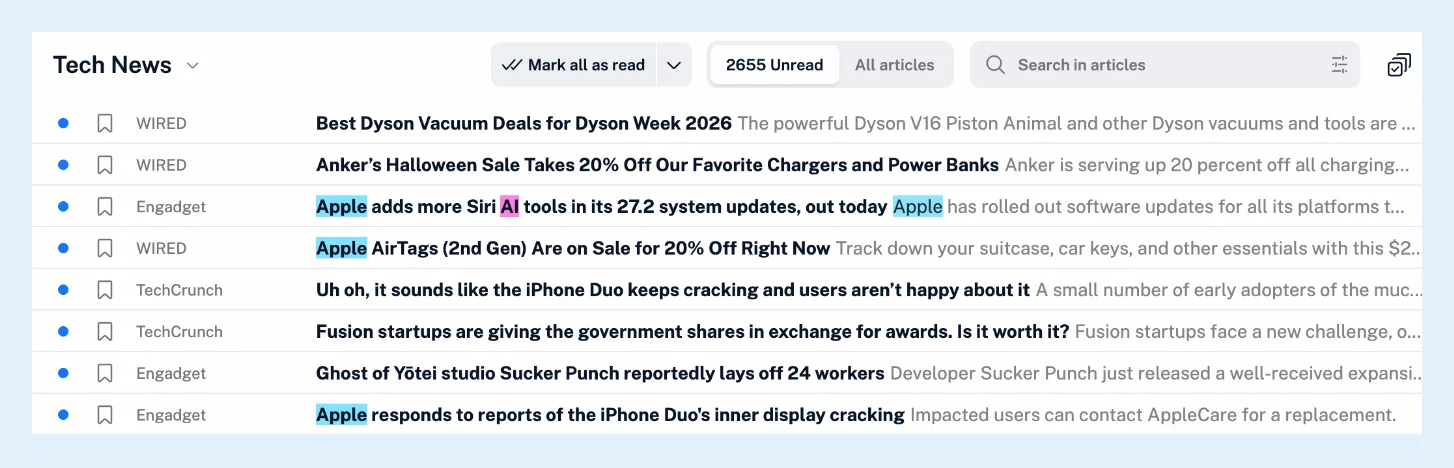
Colored terms in lists and articles
The terms are colored in the article lists of every section, whether a feed, a folder, Read later or a tag, and in the article when you open it, in its preview, in a translated article and in an AI summary.
Term matching
Matching ignores capitalization unless you tick Case sensitive on the term, which keeps short names and acronyms apart from ordinary words. A one-word term matches whole words only, so "AI" isn't colored inside "said", while a phrase or a term with punctuation matches wherever it appears. Longer terms are matched first, so "Apple Watch" is colored as one phrase before "Apple" is.
Pause a spotlight
The switch in the Status column of the Spotlights page turns a spotlight off: it isn't applied until you switch it back on, so you can pause one when a project ends without creating it again. There's no limit on spotlights or terms.
Spotlights, highlights and filters
A spotlight colors a term everywhere it appears, while a highlight in Annotations marks a passage you select in one article. A spotlight also never removes an article: to hide or keep articles by keyword, use a filter.
Plans and limits
Spotlights are free on every plan, and on Team plans a Team admin can also share a spotlight with the whole Team. The feature page Make the names you care about stand out and the video show them.
Can't find an answer? Contact support