What does "Edited" on an article mean?
Edited means the publisher changed the article's title or text after Inoreader first received it, and Inoreader kept the earlier version. The mark sits in the article's header right after its time and says how long ago the last edit was, for example Edited 2h ago.
The mark in the article header
Open an article and look at the line with the author and source. Edited 2h ago means the last edit was two hours ago. When the article is shown wide enough, a View edits link follows with the number of edits, such as View edits (3). Click the mark or the link to open the list of edits.
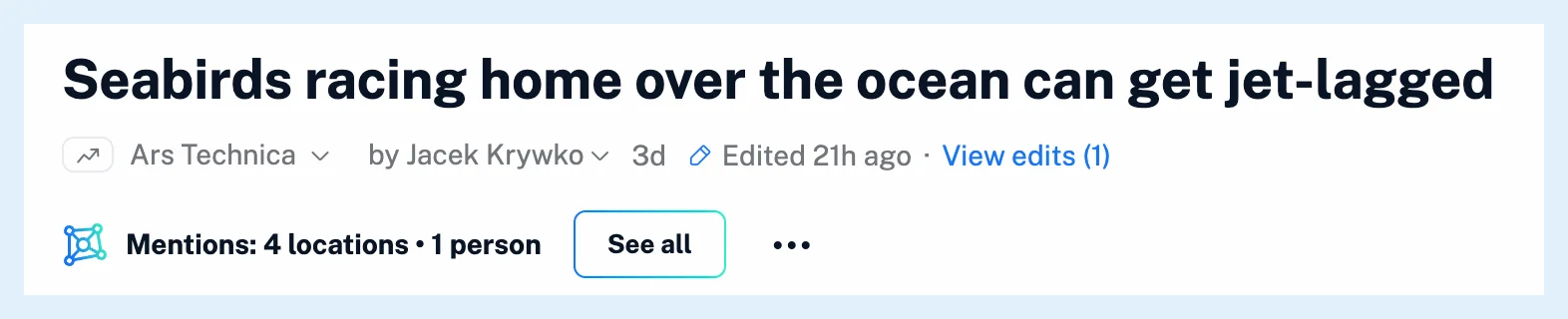
The mark is part of the author and source line, so it's hidden when Author and source is off in Preferences > Power user settings.
Changes that count as an edit
Inoreader compares the article as the feed delivers it on each check, not the publisher's web page. An edit is a change of the visible title or text. Changes you wouldn't read as an edit are ignored: comment counters, dates and numbers alone, ads and promo lines the feed repeats under other articles, tracking links, tag lists and moved paragraphs. Pictures aren't compared.
Recording period and limits
Inoreader records edits during the article's first week and keeps up to 20 edits per article, along with the version as first published. For live blogs that change constantly, it records at most three edits an hour after the third one. Sources whose items are streams rather than articles get no mark, such as Google News, court dockets, Wikipedia diffs and headline aggregators. Articles received before October 2026 have no edit history.
Edits and your own copy
If you highlighted, translated or loaded the full content of an article and the publisher edits it later, a bar above the text names the copy you're reading, says how many times the publisher has edited the article since and offers Show changes. Highlights keep their place, as what are annotations explains.
Every plan sees the Edited mark, and opening the edits is part of Pro, Team and Custom plans, as is edit history available in all plans explains. How do I see what changed in an article? walks through the list and the changes, and See what changed after an article was published gives the overview.
Can't find an answer? Contact support