How can I restore articles accidentally marked as read?
Right after Mark all as read, click Undo in the "Marked section as read." message at the bottom of the screen: it stays about six seconds and puts every feed back where it was. Later, pick a period such as Older than a day from the arrow next to Mark all as read, and every article newer than that becomes unread again.
Only the last Mark all as read can be undone, and only once. Articles you had read one by one stay read and come back one at a time with Mark as unread.
Restore a period later
- Open the feed, folder or Newsfeed you marked as read.
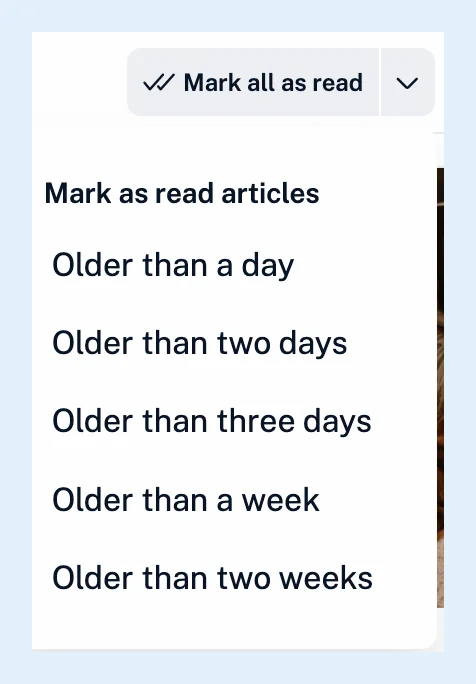
- Click the arrow next to Mark all as read. The Mark as read articles menu offers Older than a day, Older than two days, Older than three days, Older than a week and Older than two weeks.
- Choose the period that covers what you lost. Articles newer than that become unread again in every feed of the view. The ones you had opened, scrolled past or marked with M stay read.
Restore one article
Open it, for example from Recently read in the profile panel (click your avatar at the bottom of the tab bar), and click Mark as unread in its button row in the reading panel, or press M. An article that a Mark all as read covered has no Mark as unread button. Use the Older than options for those. Multiple select marks up to 50 selected articles unread at once.
Articles that stay read
An article older than 30 days stays read whatever you do, and so does one that a folder's Keep unread setting (Pro) marked read sooner. Find them under All articles (Shift + 2) or with the search, and save the ones that matter to Read later. In tags, Mark all as read marks each article read one by one, the message has no Undo, and the Older than options only mark more articles read.
Prevent it
Under Preferences > Settings > Article listing > Mark as read behavior, keep Mark all as read Undo on. Mark as read confirmation asks before more than 100 articles are marked read. Both are on by default. The other settings are in how to customize how articles are displayed.
Undo, the Older than options and Mark as unread work on every plan. Multiple select is Pro.
Can't find an answer? Contact support